How to analyze UK procurement data: A step-by-step guide on getting started

For the first time ever, the UK has a single, comprehensive view of public procurement. The new notice regime tracks contracts across their entire commercial lifecycle, from planning and market engagement through to tendering and implementation. All the data from these notices are collected and published on a central digital platform, Find a Tender Service (FTS), in a structured, machine-readable and reusable format, under open data licenses.
This data is publicly available through the FTS API. We expect the data to become even more accessible directly within FTS, along with a comprehensive data dictionary to help users navigate the fields and understand what each one means.
For those who are not familiar with APIs, OCP also makes this data available as CSV and Excel files in our Data Registry. We know that diving into this data can feel intimidating, with dozens of sheets, nested relationships, and unfamiliar field names. It’s a lot to take in!
In this blog post, we will walk you through how to start analyzing UK FTS data from the new procurement regime. We will get the Excel files from the Data Registry and use Python for the analysis.
Understanding OCDS data
FTS data uses the Open Contracting Data Standard (OCDS), which is a free, non-proprietary open data standard for public contracting. It describes how to publish data and documents about contracting processes, covering all stages from planning to implementation.
OCDS organizes procurement data around a contracting process, and each contracting process has a unique identifier called an ocid.
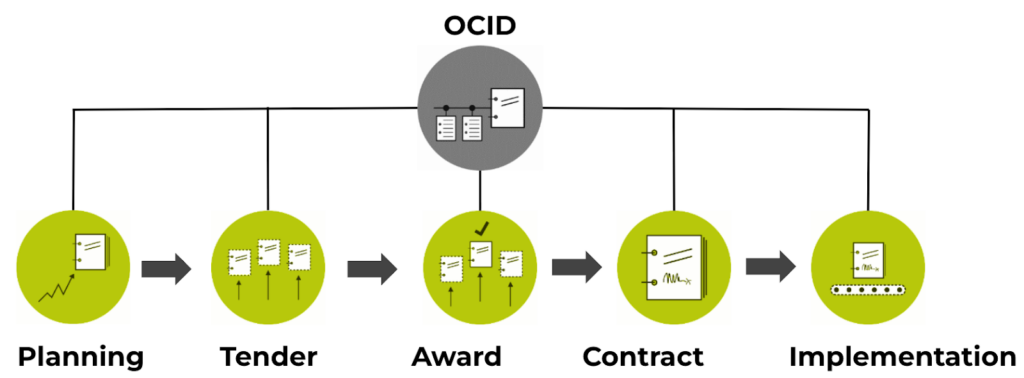
Within each process, data is organized into stages: planning, tender, awards, and contracts. Each stage can contain arrays of objects. For example, a single tender can have multiple lots and multiple awards, and each award can have its own supplier.
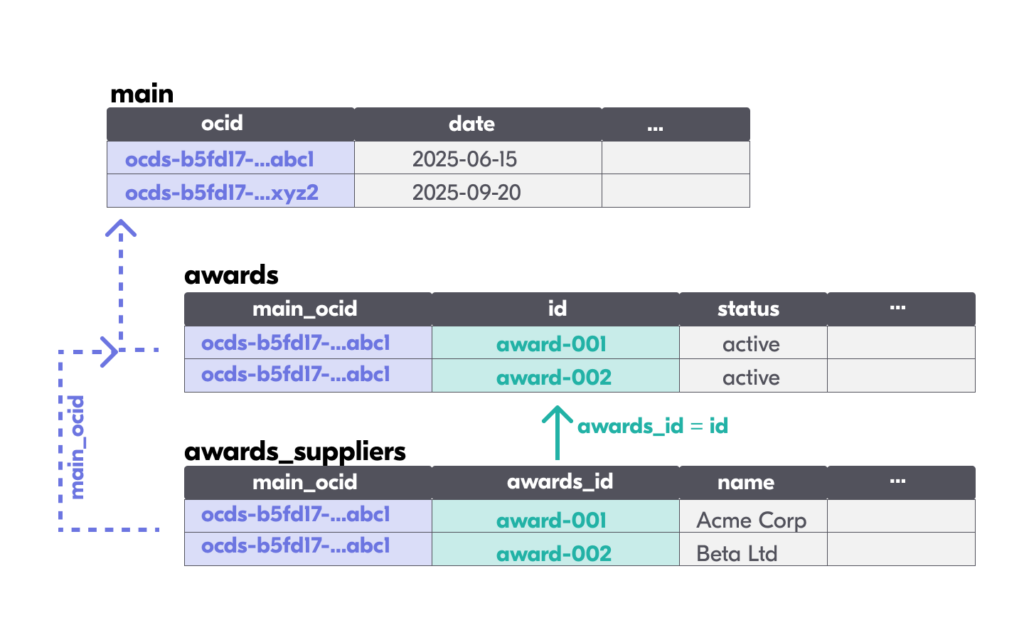
OCDS data is structured as JSON, which allows for nested arrays and objects. To make it accessible in spreadsheet tools, the data is flattened into multiple sheets. Each array in the JSON becomes a separate sheet in the Excel file. In the OCDS flattened version, published in the Data Registry, each contracting process is represented as one row in the main sheet, and each sheet is linked to its parent sheet via the [sheet_name]_id column.
The linking rules are:
- Every child sheet links back to the main sheet via the main_ocid column, which matches main.ocid.
- Nested child sheets link to their parent sheet via a [parent_sheet_name]_id column. For example, awards_suppliers.awards_id matches awards.id, and contracts_documents.contracts_id matches contracts.id.
The Excel file has many sheets. In the table below we list the ones that could be most commonly used for analysis, including those we used for our one-year analysis:
| Sheet | Description | Links to main via | Links to parent via | Some of the key columns |
|---|---|---|---|---|
| main | One row per contracting process. It includes information from the tender stage | — | — | ocid, date, tender_* fields |
| awards | Awards issued for the tenders. Each row is an award. | main_ocid | — | id, status, relatedLots |
| awards_suppliers | Suppliers per award. Each row is a supplier. | main_ocid | awards_id → awards.id | name, identifier |
| parties | Organizations referenced. Each row is a party linked to a specific procurement process. | main_ocid | To link to suppliers or buyer information, besides the main_ocid the roles should be used | name, roles, identifier, details_scale |
| contracts | Signed contracts. Each row is a contract | main_ocid | awardID → awards.id | id, dateSigned, value_amount |
| tender_lots | Lots within tenders. Each row is a lot. | main_ocid | — | id, suitability_sme |
| tender_lots_awardc_criteria | Award criteria per lot. | main_ocid | tender_lots_id → tender_lots.id | criteria, name |
| bids_statistics | Bid counts per lot. Each row is a bid measure, related to a lot and a procurement process. | main_ocid | — | relatedLot, measure, value |
| planning_documents | Planning stage documents. Each row is a document | main_ocid | — | noticeType, datePublished |
| tender_documents | Tender stage documents. Each row is a document | main_ocid | — | noticeType, datePublished |
| awards_documents | Award stage documents. Each row is a document | main_ocid | awards_id → awards.id | noticeType, datePublished |
| contracts_documents | Contract stage documents. Each row is a document | main_ocid | contracts_id → contracts.id | noticeType, datePublished |
In the Data Registry, OCDS data is published using compiled releases, which provides the latest value of each field. The compiled release brings together all events in a contracting process (such as a tender published, a bid received, an award made, an amendment and so on) so users can see the most recent version of the data in one place. If you want to learn more about how releases work in OCDS, check out our learning video.
Loading and combining data
If you are working with data that spans multiple export files (e.g., one per year), you can combine them. Since the data from the Data Registry uses compiled releases, for each ocid, you will always get the most up-to-date information about the procurement process, so you just need to append the files.
Example on how to do this in Python with 2025 and 2026 data:
import pandas as pd
EXCEL_2025 = 'https://data.open-contracting.org/en/publication/41/download?name=2025.xlsx'
EXCEL_2026 = 'https://data.open-contracting.org/en/publication/41/download?name=2026.xlsx'
def load_and_concat(sheet_name, xl25, xl26):
  """Load a sheet from both yearly files and concatenate."""
  frames = []
  if sheet_name in xl25.sheet_names:
    frames.append(xl25.parse(sheet_name))
  if sheet_name in xl26.sheet_names:
    frames.append(xl26.parse(sheet_name))
  if not frames:
    return pd.DataFrame()
  return pd.concat(frames, ignore_index=True)
xl25 = pd.ExcelFile(EXCEL_2025)
xl26 = pd.ExcelFile(EXCEL_2026)
main = load_and_concat('main', xl25, xl26)
main['date'] = pd.to_datetime(main['date'], utc=True)
# Child sheets
awards = load_and_concat('awards', xl25, xl26)
contracts = load_and_concat('contracts', xl25, xl26)
parties = load_and_concat('parties', xl25, xl26)
# ... repeat for all sheets you need
Filtering procedures following the new procurement legislation
Not all procurement data in the FTS follows the same legal framework. Procedures under the Procurement Act 2023 are identified by the tender_legalBasis_scheme field = ‘UKPGA’. You will need to filter the relevant ocids from the new regime.
main_ukpga = main[main['tender_legalBasis_scheme'] == 'UKPGA'].copy()
# Create a set of ocids for filtering all child sheets
ukpga_ocids = set(main_ukpga['ocid'])
print(f"UKPGA processes: {len(main_ukpga)}")
This set of ocid values can be used throughout your analysis to filter every child sheet via its main_ocid column. The consistent pattern is:
# Filter any child sheet to only UKPGA processes
awards_ukpga = awards[awards['main_ocid'].isin(ukpga_ocids)]
contracts_ukpga = contracts[contracts['main_ocid'].isin(ukpga_ocids)]
parties_ukpga = parties[parties['main_ocid'].isin(ukpga_ocids)]
Linking information across sheets
To analyze and calculate common procurement metrics, you need to combine information from different sheets. All joins use main_ocid as the primary link to the main sheet, plus [parent_sheet]_id to link nested tables to their direct parent.
Below, we provide examples of how to do common joins that are useful for analysis:
Linking contracts to procurement methods
Contracts don’t directly have the procurement method, as this information lives in the main sheet under tender_procurementMethod (field using the OCDS codelist) and tender_procurementMethodDetails (local procurement methods). To analyze contracts by method, join on main_ocid:
#Filter only contracts related to UKPGA
contracts_ukpga = contracts[contracts['main_ocid'].isin(ukpga_ocids)].copy()
#Merge both dataframes
contracts_full = contracts_ukpga.merge(main_ukpga[['ocid', 'tender_procurementMethod', 'tender_procurementMethodDetails']],
    left_on='main_ocid', right_on='ocid',
    how='inner', suffixes=('', '_main'))
Linking contracts to suppliers and getting the supplier details
One useful join is connecting a contract to its suppliers’ details (such as whether they’re SMEs). This requires the three sheets awards_suppliers, contracts and parties. If you require more variables, like the tender_procurementMethodDetails, you might need to join with the main sheet.
Here is the join pattern:
- Step 1: Join contracts to the award’s suppliers, using the main_ocid variable in the contracts and awards_suppliers sheets and contracts.awardID and awards_suppliers.awards_id. In this dataset a contract can have multiple suppliers, so this join duplicates contract rows that have multiple suppliers and adds one row for each supplier.
- Step 2: Link suppliers to their party scale, to identify whether it’s an SME. First, in the parties sheet, filter only rows where the roles contain ‘supplier’. Then you can link the details_scale using the main_ocid variables and the name or id. In this example, we will join by name. Note: For below-threshold contracts, around half of the suppliers do not have declared identifiers.
- Step 3: Aggregate information so that you only have one row per contract. A contract can have multiple suppliers, but the total contract value is not disaggregated per supplier. This can make it hard to determine the exact total amount awarded to each supplier. However, you can identify if a specific contract was awarded to at least one SME. To do this, you need to aggregate all supplier information into one row per contract, using main_ocid and id.
# Step 1: Link contracts to their award's suppliers
# contracts.awardID matches awards.id, and awards_suppliers.awards_id also matches awards.id
contracts_suppliers = contracts.merge(
  award_sup[['main_ocid', 'awards_id', 'name']],
  left_on=['main_ocid', 'awardID'],
  right_on=['main_ocid', 'awards_id'],
  how='left'
)
# Step 2: Link suppliers to their party details (to get SME scale)
#Filter supplier rows in the parties sheet
suppliers_with_parties = parties[parties['roles'].str.contains('supplier', na=False)]
# Parties are matched by name within the same contracting process (main_ocid)
contracts_with_scale = contracts_suppliers.merge(
  suppliers_with_parties[['main_ocid', 'name', 'details_scale']],
  on=['main_ocid', 'name'],
  how='left'
)
# Step 3: Aggregate per contract
suppliers_agg = (
  contracts_with_scale
  .groupby(['main_ocid', 'id', 'tender_procurementMethodDetails', 'status',
       'value_amount', 'value_currency'], dropna=False, as_index=False)
  .agg(
#New variable that counts the number of suppliers per contract
    total_suppliers=('name', 'nunique'),
#New variable that aggregates the supplier scales, dropping dupplicates
    supplier_scales=('details_scale',lambda x: ', '.join(x.dropna().unique())),
#New variable that aggregates the supplier names, dropping dupplicates
    supplier_names=('name', lambda x: ', '.join(x.dropna().unique()))
  )
)
# Step 4: Flag contracts with at least one SME supplier
suppliers_agg['has_sme'] = suppliers_agg['supplier_scales'].str.contains(
  'sme', case=False, na=False
)
Finding notice types per procedure
The new procurement regime established 16 notice types (UK1 through UK16), each representing a different stage or event in the procurement process. A single ocid can have different notice types: for example, a UK2-preliminary market engagement notice, followed by a UK4-tender notice, and then a UK6-contract award notice.
| Code | Notice | Stage | Found in sheet |
|---|---|---|---|
| UK1 | Pipeline notice | Planning | planning_documents |
| UK2 | Preliminary market engagement | Planning | planning_documents |
| UK3 | Planned procurement notice | Planning | planning_documents |
| UK4 | Tender notice | Tender | tender_documents |
| UK5 | Transparency notice | Tender | tender_documents |
| UK6 | Contract award notice | Award | awards_documents |
| UK7 | Contract details notice | Contract | contracts_documents |
| UK10 | Contract change notice | Contract | contracts_documents |
| UK11 | Contract termination notice | Contract | contracts_documents |
| UK12 | Procurement termination notice | Tender | tender_documents |
| UK13-16 | Dynamic market notices | Tender | tender_documents |
Each notice appears as a row in the relevant *_documents sheet, with a noticeType column containing the code (e.g., “UK2”).
Counting notices by type
To count how many notices of each type have been published, you need to query all four document sheets and combine the results. We used the following deduplication strategy, from inferred logic (the official count of distinct notices from the Cabinet Office could be different, due to different methodologies used):
We count the number of documents published by notice type, using the fields documents/noticeType that can be found in the planning, tender, awards and contracts objects.
Since different versions of the same notice type can be published multiple times in the same procedure and recorded as a separate document, this indicator counts a single notice type per procedure (ocid) for notices UK1, UK2, UK3, UK4, UK12, UK13, UK14, UK16. For instance, procedure ocds-h6vhtk-04e781 has 3 versions of a UK3 notice, so this is counted only once. For UK5 and UK6, for each award, if multiple versions of the same notice type are published (with distinct ids), only the latest is considered. Then, since the same UK5 or UK6 notice can be linked to multiple awards, the number of distinct notices is calculated by counting the distinct documents/id. For the procedure ocds-h6vhtk-04fb96, one award has multiple UK6 notices, but only one is counted. In procedure ocds-h6vhtk-04e851, the same UK6 notice is linked to multiple awards, so this is only counted once. Similarly, for UK7 and UK11 notices, if multiple notices are published in the same contract, only the latest is considered. Then, since the same UK7 notice can be linked to multiple contracts, the number of distinct notices is calculated by counting the distinct documents/id. For notices UK10 and UK15, the distinct documents/id is counted, as you can have multiple modifications for the same procedure and contract.
# Planning notices: count distinct ocids per notice type
plan_docs = planning_docs[planning_docs['main_ocid'].isin(ukpga_ocids)]
plan_notices = (
  plan_docs
  .groupby('noticeType')
  .agg(distinct_notices=('main_ocid', 'nunique'))
  .reset_index())
# Award notices: keep only the latest version per (ocid, award, noticeType)
award_docs_ukpga = award_docs[award_docs['main_ocid'].isin(ukpga_ocids)].copy()
award_notices = (
  award_docs_ukpga
  .sort_values(['main_ocid', 'noticeType', 'datePublished'])
  .drop_duplicates(subset=['main_ocid', 'awards_id', 'noticeType'], keep='last')
  .groupby('noticeType')
  .agg(distinct_notices=('id', 'nunique'))
  .reset_index())
Getting all notices published by ocid
A useful intermediate step is building a “wide” table that shows, for each ocid, which notice types it has:
# Combine all document sheets
all_notices = pd.concat([
  plan_docs[['main_ocid', 'id', 'noticeType']],
  tender_docs_ukpga[['main_ocid', 'id', 'noticeType']],
  award_docs_ukpga[['main_ocid', 'id', 'noticeType']],
  contract_docs_ukpga[['main_ocid', 'id', 'noticeType']],
], ignore_index=True)
# Binary presence table: 1 if the process has that notice type, 0 otherwise
notices_wide = (
  all_notices
  .groupby(['main_ocid', 'noticeType'])['id']
  .nunique()
  .unstack(fill_value=0)
  .clip(upper=1) # Convert counts to binary 0/1
  .reset_index())
This table enables cross-notice-type questions. For example, what proportion of processes with a UK2 (PME) also published a UK4 (tender)?
# What proportion of processes with a UK2 (PME) also published a UK4 (tender)?
pme_processes = notices_wide[notices_wide.get('UK2', 0) == 1]
pme_with_tender = pme_processes[pme_processes.get('UK4', 0) == 1]
print(f"{len(pme_with_tender) / len(pme_processes) * 100:.1f}% of PME processes also have a tender notice")
Which date to use?
The date field in the main sheet indicates the latest date a procedure was updated (the date of the latest release). You can use this field as your reference date or depending on the metric you want to calculate, you might want to use other date fields for your analysis.
If you are analyzing contracts over time, it’s best to use the contracts.dateSigned field. You can also extract the date of the first notice published for a specific ocid, and use this as a “start date” of that procedure. Depending on the types of procedures you could use specific notice dates: using only the first publication date of a UK4 tender notice, for the procedures that have one, or the date of a UK5, UK6 or UK7 if the procedures only have these. In our analysis, we mainly used the date field and the contracts.dateSigned depending on the indicators. In the shared notebook, we add an example of how you can extract other dates from the dataset and use them to show trends over time.
Calculating procurement indicators
We calculated a set of key indicators to gain insights after one year of the new UK Procurement Act’s implementation.
In this notebook, we include examples of how to calculate some of the indicators featured in our blog. It covers:
- How to load the data and filter it for UKPGA
- Notices by type: How many notices of each type (UK1-UK16) have been published.
- Direct awards: Proportion of direct award procedures and trend over time.
- Contract value by method: Total contract value awarded, broken down by procurement method, excluding framework agreements
- Single bid lots: Proportion of lots receiving only one bid, an indicator of competition levels.
- Competitive flexible procedures: Adoption and trends for this new procedure type.
- SME participation: Proportion of contracts awarded to SMEs by method.
We hope this is helpful to get you started on analyzing FTS data. If you have any questions on OCDS or want to share your analysis, please reach out!


